How to Design Digital Stickers That Sell
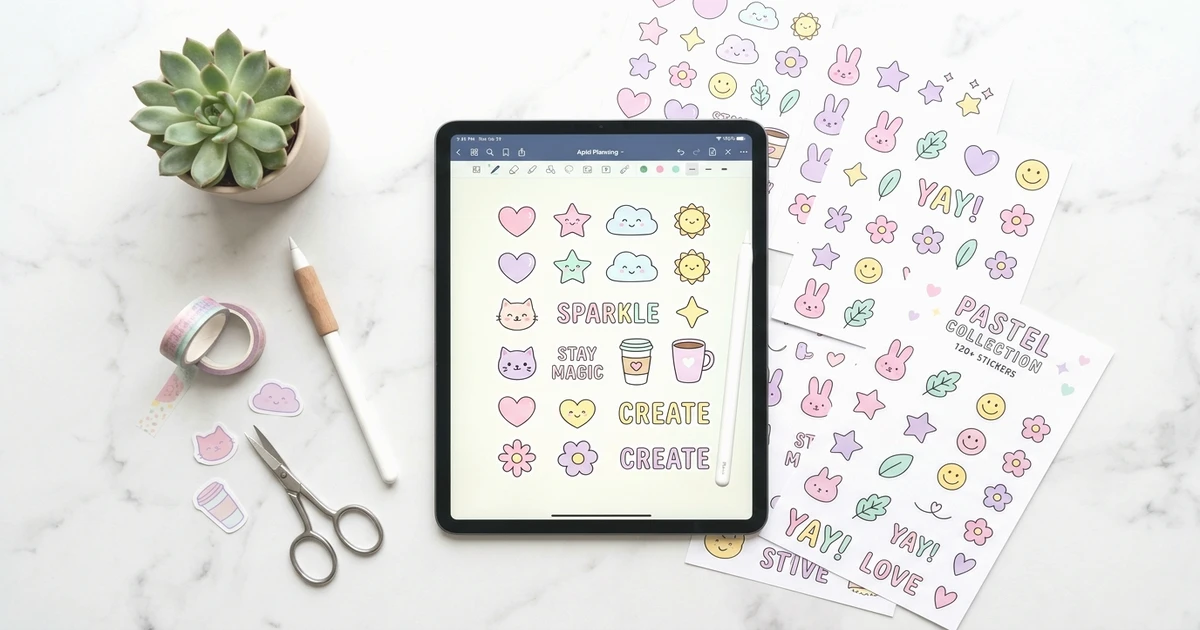
Digital stickers are one of the most profitable digital products you can create. Zero inventory, near-zero costs, and profit margins above 90%. But here's what most guides won't tell you: the difference between a sticker shop that earns $50 a month and one that earns $5,000 isn't the tool you use — it's how you design digital stickers that people actually want to buy and use every day.
We've designed and sold sticker packs at Forjio Studio, so this isn't theory. This is what we've learned about design principles, trending aesthetics, file specs, and pricing psychology that move product.
What Are Digital Stickers (And Why They're a Goldmine)
Digital stickers are PNG or PDF image files that users drag and drop into apps like GoodNotes, Notability, and digital planners on their iPads. Unlike physical stickers, there's no printing, no shipping, and no inventory. You design once, list once, and sell infinitely.
The economics are hard to argue with. Top Etsy sticker shops report lifetime revenues between $100K and $400K. A single well-designed sticker pack priced at $3.99 can generate passive income for years with zero fulfillment cost. Your only investment is time and creative skill.
Tip
Digital stickers pair naturally with digital planners. Buyers who purchase a planner often return for sticker packs that match the aesthetic — creating repeat customers without additional marketing.
Forjio Studio
Dark Academia Planner 2026
A 132-page digital planner with dark walnut, parchment & gold aesthetic.
Learn more →Find Your Sticker Niche Before You Design
The biggest mistake new sticker creators make is designing what they like instead of what the market wants. Before you open any design tool, spend time researching which aesthetics and themes are actually selling.
Trending Aesthetics in 2026
- Kawaii characters with chibi proportions — round faces, exaggerated expressions, pastel color palettes. Consistently the highest-selling aesthetic on Etsy.
- Cottagecore evolved into 'nature as comfort' — mushrooms, wild herbs, tiny woodland animals, muted earth tones with watercolor textures.
- Minimalist line art with accent colors — clean single-weight outlines with one or two pop colors. Perfect for professional and academic planners.
- Retro illustrated styles — vintage botanical illustrations, 70s typography, and hand-lettered quotes with distressed textures.
- Hyper-personalized mini stickers — sheets of 20 to 50 tiny functional stickers (habit trackers, mood indicators, mini icons) designed for dense planner spreads.
How to Research What Sells on Etsy
Search 'digital stickers' on Etsy and sort by bestselling. Study the top 20 listings. Note the aesthetic style, number of stickers per pack, price point, and how the listing photos are styled. Pay attention to review counts — a listing with 5,000+ reviews tells you that specific design style has proven demand. Don't copy these sellers. Understand what patterns they share, then bring your own visual identity to those patterns.
Design Principles That Make Digital Stickers Sell
Most guides focus on which buttons to click in Canva. That's the easy part. What actually separates stickers that sell from stickers that sit is design fundamentals — and these apply whether you use Canva, Procreate, or AI-assisted tools.
Transparent Backgrounds Are Non-Negotiable
Every digital sticker must have a transparent background. This is the single most common complaint in 1-star reviews — buyers who receive stickers with white boxes around them. Export as PNG with transparency enabled. Always test by placing your sticker on both a light and dark background before listing.
Size, Resolution, and File Format
Design at 2000x2000 pixels at 300 DPI for maximum quality. Buyers resize down, but they can't resize up without losing quality. Export as PNG for individual stickers and PDF for sticker sheets. For GoodNotes compatibility, individual pre-cropped PNGs work best — users can drag and drop without cropping.
Color Palettes That Pop on Digital Planners
Your stickers need to look good on the backgrounds buyers actually use — white, cream, kraft paper brown, and dark mode black. Test your palette against all four. Stickers with medium saturation and good contrast work across the widest range of planner pages. Avoid pure neon colors that clash with everything and very light pastels that disappear on white backgrounds.
White Borders for a Professional Look
Adding a 5-10 pixel white border (or 'kiss cut' outline) around your stickers gives them a polished, physical-sticker feel. This small detail increases perceived quality significantly. It also helps stickers stand out on busy planner pages. Most top-selling sticker shops use this technique consistently.
Note
Consistency within a pack matters more than individual sticker quality. A cohesive pack with a unified color palette, line weight, and style will always outsell a pack of individually great but visually disconnected stickers.
Essential Design Tools for Digital Stickers
You don't need expensive software to create stickers that sell. The tool matters less than the design principles you apply.
- Canva (free/pro) — Best for beginners. Pre-made elements, easy transparent PNG export, and the new Magic Studio AI features for generating sticker bases. Limitation: less control over fine details than Procreate.
- Procreate ($12.99 one-time) — Best for hand-drawn styles. Full brush control, natural textures, and the ability to create truly unique artwork. Requires an iPad and Apple Pencil.
- AI-assisted workflow — Use Midjourney or Canva Magic Studio to generate sticker concepts, then refine in Canva or Procreate. This is how many successful 2026 sellers work: AI for speed and ideation, manual refinement for quality and uniqueness.
Creating Sticker Packs That Outsell Singles
Individual stickers sell. But bundles sell 3 to 5 times more by average order value. Buyers perceive better value in a pack of 20 stickers for $5.99 than a single sticker for $1.99, even though your per-sticker revenue is lower. The key is themed collections.
Group stickers into themes your audience actually uses: 'Daily Planner Essentials' (checkboxes, arrows, flags, tabs), 'Self-Care Sunday' (bath, candles, face masks, tea), 'Study Session' (books, highlighters, coffee, timers). Each theme should have 15 to 30 stickers that work together visually and functionally.
Making GoodNotes and Notability Compatible Files
For GoodNotes, provide individual pre-cropped PNG files that users import to their Elements collection. For sticker books (a premium format), create a PDF with transparent-background stickers arranged on pages — users open it as a separate tab and copy-paste stickers into their planners. Sticker books command higher prices ($8-15) because of the convenience factor.
Pricing Your Digital Stickers for Maximum Revenue
Pricing is psychology, not math. The market has established clear tiers: individual stickers at $1.99-$3.99, themed packs at $4.99-$7.99, and premium bundles (mega packs or sticker books) at $9.99-$19.99.
Use charm pricing ($3.99 instead of $4.00) — it works in digital products just as it does in retail. More importantly, use anchor pricing: list a premium bundle at $14.99 on the same shop page as your $4.99 pack. The pack suddenly feels like a deal by comparison. Always include a 'best value' bundle option — it becomes the most popular choice for roughly 60% of buyers.
Where to Sell Your Digital Stickers
Etsy is the default marketplace with 81.9 million active buyers already searching for digital stickers. The built-in traffic alone justifies the listing fees and the small per-transaction cut. But smart sellers never rely on a single platform — diversification protects your income.
Your own website (through Gumroad, Shopify, or Payhip) gives you higher margins, customer email addresses, and full control over your brand experience. Many successful sellers use Etsy for discovery and their own site for repeat purchases and bundles.
Marketing Your Sticker Shop
Pinterest and Instagram are where sticker buyers discover new shops. On Pinterest, create pins showing your stickers in use on planner pages — context sells better than product shots alone. On Instagram, post Reels of your design process (time-lapses of creating stickers perform exceptionally well) and carousels showcasing sticker packs in themed layouts.
On Etsy, optimize your listing titles and tags with specific keywords: 'kawaii digital planner stickers GoodNotes' outperforms 'cute stickers' because buyers search with intent. Use all 13 Etsy tags per listing and include long-tail variations.
When you're promoting across multiple platforms — Pinterest, Instagram, Etsy, your own site — tracking which channels actually drive sales becomes critical. Use a link shortener to create unique trackable links for each platform so you know where your buyers are coming from and where to focus your effort.
Start Designing Today
The digital sticker market rewards creators who understand design fundamentals, not just tool mechanics. Pick a trending aesthetic that resonates with you, apply the principles in this guide — transparent backgrounds, tested color palettes, cohesive themed packs, strategic anchor pricing — and launch your first listing. Start with a single pack of 15 to 20 stickers in one cohesive theme. Test it on Etsy, gather feedback from reviews, and iterate on your next pack based on what buyers respond to.
The creators earning $5,000 or more per month from digital stickers all started with a single pack and a willingness to learn what the market actually responds to. The design tools are free or cheap. The profit margins are exceptional — often above 90% after platform fees. The only real barrier between you and your first sale is the decision to start designing, listing, and iterating based on real buyer feedback.
Related Posts
Apr 7, 2026 · 6 min read
How to Sell Digital Products on Etsy in 2026
Learn how to sell digital products on Etsy in 2026. A complete guide covering shop setup, Etsy SEO, pricing, marketing with branded links, and scaling.
Apr 5, 2026 · 6 min read
How Digital Stickers Transform Your Planner and Notes
Digital stickers make planners and notes more functional, not just prettier. Learn how to use them for organization, habit tracking, and creative expression.
Apr 10, 2026 · 6 min read
Why Every Creator Needs a Link-in-Bio Tool
Discover why a link-in-bio tool is essential for creators selling digital products. Learn how to turn followers into paying customers with one smart link.