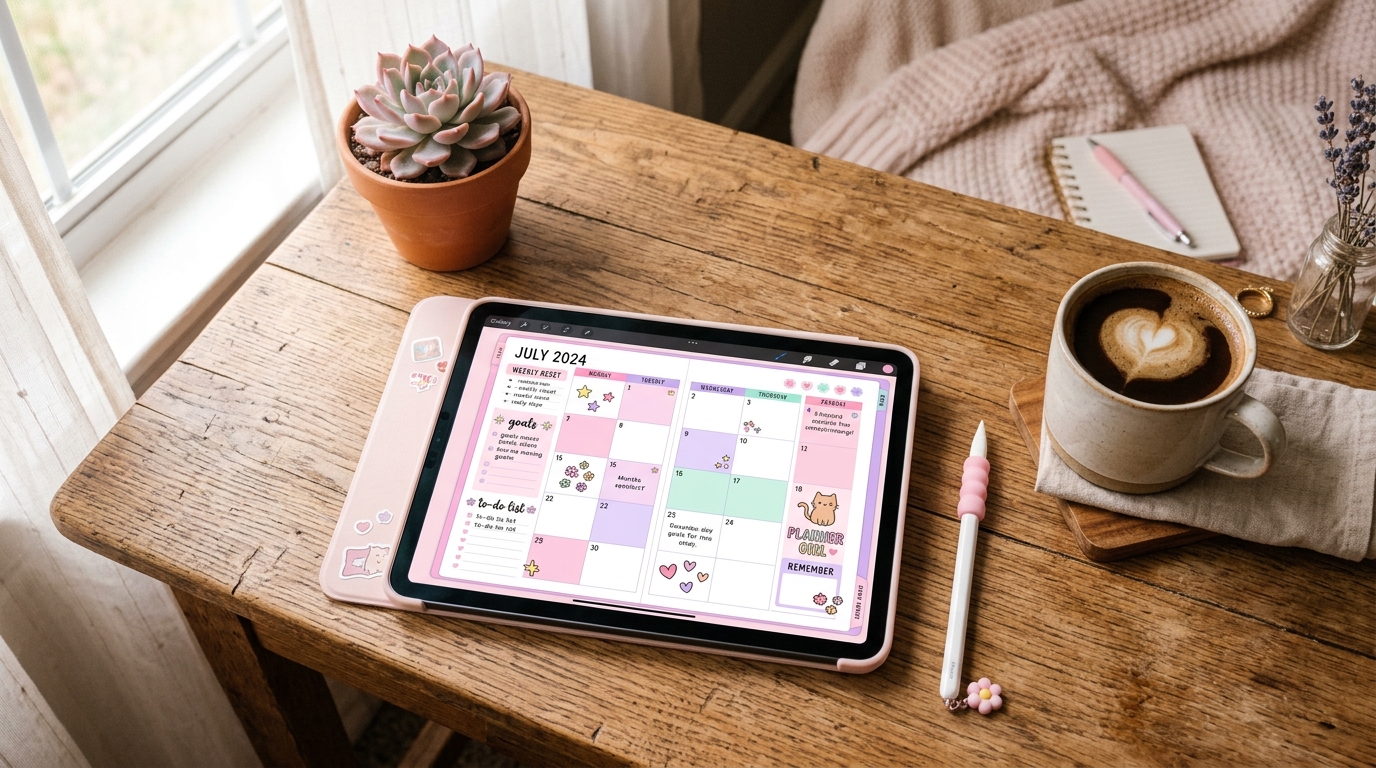
How Digital Stickers Transform Your Planner and Notes
Your Digital Planner Feels Empty Without These
You downloaded a digital planner. You opened it in GoodNotes or Notability. You wrote in a few tasks. And then you stopped using it within a week. Sound familiar? You are not alone. The number one reason people abandon digital planners is that the pages feel sterile and impersonal. There is no warmth, no visual cues, no reason to open the app instead of grabbing a sticky note. Digital stickers fix that problem completely.
Digital stickers are not just decoration. They are functional tools that turn a blank planner page into a system you actually want to use. Tabs for navigation, labels for priority, icons for habit tracking, decorative elements that make your weekly spread feel like yours. When your planner looks good and works well, you stick with it.
What Are Digital Stickers and How Do They Work?
Digital stickers are PNG or PDF images with transparent backgrounds designed to be placed on digital planners, notebooks, and documents. You import them into apps like GoodNotes, Notability, Noteshelf, or any PDF annotation tool. Then you drag, drop, resize, and arrange them exactly where you want. No scissors, no glue, no regrets about placement. If a sticker is in the wrong spot, you move it. If you want the same sticker on every weekly spread, you duplicate it in seconds.
Most digital sticker packs come as PNG files organized in folders or as a single PDF sheet you can cut and paste from. The transparent background is what makes them work. The sticker sits cleanly on your planner page without a white rectangle around it, just like a real sticker on paper.
Tip
Look for sticker packs that include both individual PNG files and a pre-arranged PDF sheet. PNGs give you maximum flexibility for placement, while PDF sheets are faster for browsing and grabbing stickers on the go.
5 Ways Digital Stickers Make Your Planner Actually Useful
1. Visual Priority System
Color-coded label stickers let you build an instant priority system. Red for urgent, yellow for in-progress, green for done. When you open your weekly spread, you immediately see what needs attention without reading a single word. Your eyes find the red labels first. That is the power of visual hierarchy in planning. Studies on visual information processing show that humans process images 60,000 times faster than text. A color-coded sticker system leverages that biology.
2. Habit Tracking With Style
Habit trackers are the most popular planner feature, but filling in tiny checkboxes gets boring fast. Replace them with themed stickers. A water glass sticker for each cup you drink. A dumbbell for each workout. A book for each chapter read. Suddenly tracking habits feels like collecting achievements instead of checking boxes. The small dopamine hit of placing a sticker is real, and it keeps you coming back to the tracker daily.
3. Tab Navigation That Works
Digital planners can be hundreds of pages long. Without tabs, you are endlessly scrolling or searching. Tab stickers placed on page edges create instant navigation. Monthly tabs, project tabs, goal tabs. Tap the tab, jump to the section. It mirrors how physical planners use divider tabs, but with zero bulk and unlimited customization. Most digital planner power users consider tab stickers non-negotiable for any planner setup.
4. Mood and Energy Logging
Journaling prompts ask you to describe your mood in words, but stickers capture it faster and more honestly. A sunshine sticker for great days, a cloud for rough ones, a coffee cup for those running-on-caffeine Tuesdays. Over time, your planner becomes a visual mood map. Flip through a month and you can literally see patterns. That rainy-cloud cluster during week three? Maybe that recurring deadline is affecting your energy more than you realized.
5. Creative Expression Without Artistic Skill
Not everyone can draw, letter, or design. Digital stickers level the playing field. You get professionally designed elements that you arrange into layouts that feel personal. Pick your aesthetic. Minimalist line art, kawaii characters, vintage botanicals, dark academia, cottagecore florals. Your planner reflects your personality without requiring you to be a graphic designer. The stickers are the art. You are the curator.
How to Use Digital Stickers in Your Favorite Apps
GoodNotes
GoodNotes has a built-in Elements feature that lets you save stickers for instant reuse. Import your sticker PNGs into the Elements library, organize them into collections (tabs, labels, decorative, icons), and drag them onto any page with a single tap. You can also resize and rotate stickers freely. For PDF sticker sheets, use the Lasso tool to select individual stickers, copy them, and paste them where you want.
Notability
In Notability, import sticker PNGs as images. Tap the plus icon, select Image, and choose your sticker file. Once placed, you can resize and reposition it. For repeated use, create a dedicated Sticker Reference note where all your stickers live. Copy from that note and paste into your planner pages. It adds one extra step compared to GoodNotes, but the workflow is solid once you set it up.
Noteshelf and Other Apps
Noteshelf supports sticker import through its built-in sticker library. Drop your PNG files into the app and they appear alongside the default stickers. Samsung Notes, Xodo, and most PDF annotation apps support image insertion, which means any digital sticker pack works across platforms. The key requirement is PNG format with transparent backgrounds.
Note
Always check that your sticker files are PNG format with transparent backgrounds. JPEG stickers will have a white box around them, ruining the look on colored planner pages.
Choosing Digital Stickers That Match Your Planner Style
The biggest mistake people make with digital stickers is mixing styles that clash. A kawaii cat sticker next to a minimalist geometric label next to a watercolor floral creates visual chaos instead of visual harmony. Stick to one or two complementary styles per planner spread.
Start with your planner's existing aesthetic. If your planner has clean lines and neutral colors, choose stickers that match: flat design, muted tones, simple icons. If your planner is colorful and playful, lean into that with bold stickers, character illustrations, and expressive typography. Consistency is what makes a planner spread look intentional rather than cluttered.
- Minimalist planners pair well with line-art stickers, monochrome labels, and simple geometric shapes.
- Colorful planners work with kawaii characters, bold icons, and pastel-toned decorative elements.
- Dark academia planners match vintage-style stickers, serif typography labels, and botanical illustrations.
- Cottagecore or nature-themed planners suit watercolor florals, hand-drawn elements, and earth-tone palettes.
Digital Stickers vs. Physical Stickers: Why Digital Wins
Physical stickers are fun, but they come with real limitations. Once you place a physical sticker, it is permanent. Peel it off and you damage the page. Run out of a sticker you love? Buy another sheet. Want to resize one? Impossible. Digital stickers solve every single one of these problems.
- Unlimited use: buy once, use forever. Duplicate any sticker as many times as you want across every page, every planner, every year.
- Fully repositionable: move, resize, rotate, and layer stickers without any damage or residue.
- Zero storage: no drawers full of sticker sheets, no organization bins, no shipping wait times. Download and use immediately.
- Cross-device: your stickers sync across iPad, tablet, and phone. Start decorating on your iPad at home, finish on your phone during lunch.
- Eco-friendly: no paper waste, no plastic backing sheets, no shipping packaging. Digital stickers have zero physical footprint.
The only thing physical stickers have over digital ones is the tactile experience of peeling and pressing. Everything else, cost, flexibility, sustainability, convenience, digital stickers win decisively.
Build Your Starter Sticker Collection
You do not need hundreds of stickers to start. A focused starter collection covers 90% of planning needs. Here is what to look for in your first sticker pack.
- Tab stickers for navigation: monthly, weekly, and section dividers. These are the most immediately useful stickers you can own.
- Label stickers for categorization: priority levels, status tags (to-do, in progress, done), and subject labels.
- Icon stickers for habit tracking: water, exercise, sleep, reading, meditation. Pick the habits you actually track.
- Decorative stickers for personality: a small set of on-theme decorative elements that match your planner aesthetic. Quality over quantity.
- Functional stickers for structure: arrows, banners, frames, and dividers that help organize information on the page.
A single well-curated sticker pack often includes all five categories. Look for packs that are organized into clearly labeled folders so you can find what you need without scrolling through hundreds of files.
Forjio Studio
Dark Academia Planner 2026
A 132-page digital planner with dark walnut, parchment & gold aesthetic.
Learn more →Pair Digital Stickers With the Right Planner
Stickers without a planner are decorations without a home. The best digital planning setup is a well-structured planner that gives you the pages and layouts, combined with stickers that give you the visual system to make those pages work harder.
A good digital planner includes dated pages, goal-setting sections, habit trackers, and note pages. The planner provides the structure. Stickers provide the personality and the quick-glance visual system that keeps you engaged day after day. Together, they create a planning experience that is more effective than either one alone.
A planner tells you what to do. Stickers tell you how you feel about doing it. That combination is what turns planning from a chore into a ritual.
Start Decorating Your Digital Life
Digital stickers are one of those small upgrades that change how you interact with your tools every single day. They make your planner more functional with visual priority systems, navigation tabs, and habit trackers. They make your planner more personal with aesthetic elements that reflect who you are. And they make your planner more enjoyable, which is the real secret to actually using it consistently.
You do not need to overhaul your entire system. Start with one sticker pack that matches your style. Place a few tabs, add some labels, drop in a decorative element or two. Within a week, you will wonder how you ever planned without them.